
THE ROOMJETTY FEATURE GUIDE
Your Property.
Working Together.
Reservations, rates, guest care and daily operations in one shared workspace. Explore the tools for the front desk, your team and your website.
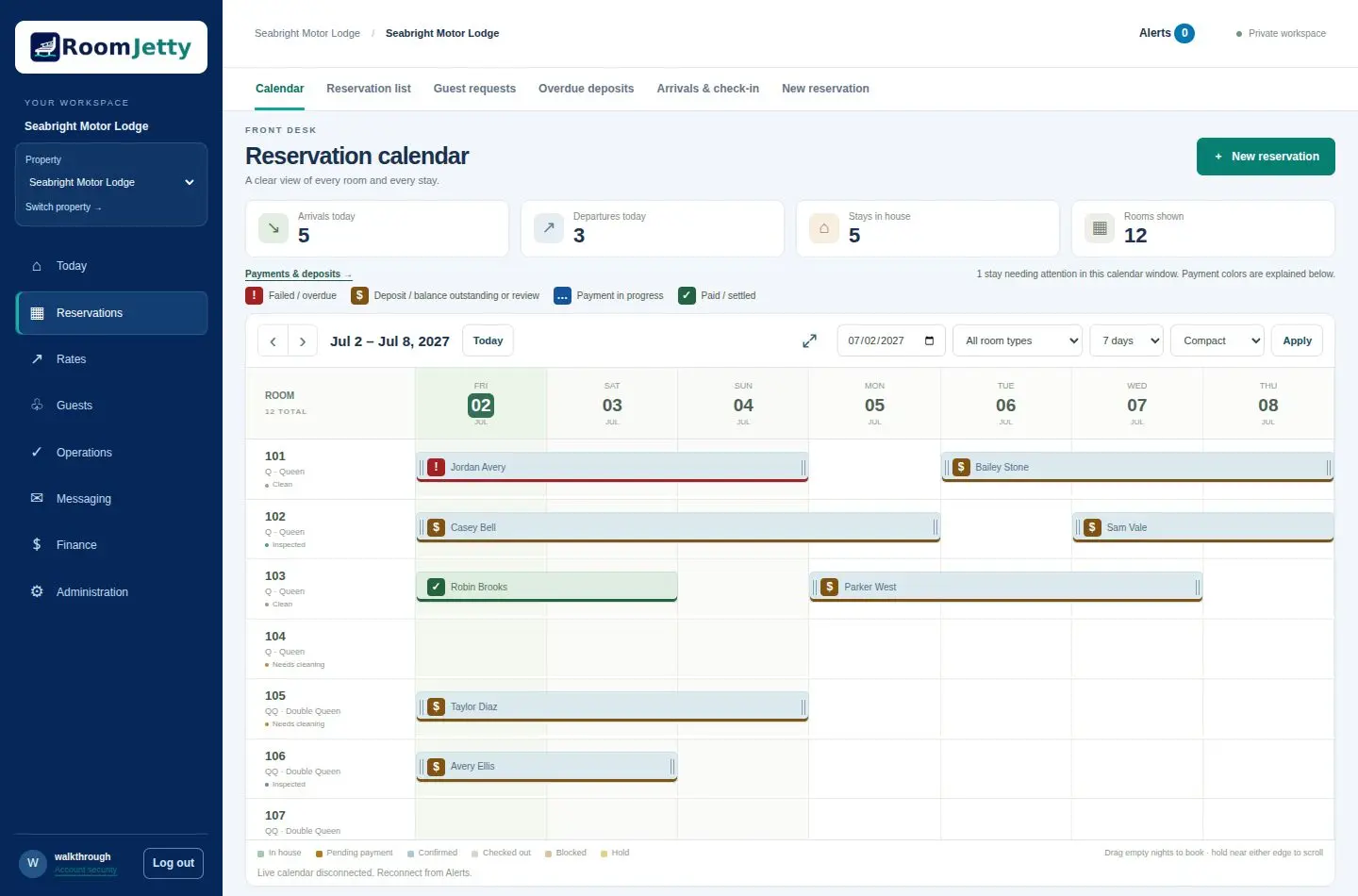
Sample property · Follow the platform walkthrough →
FIND YOUR WORKFLOW
What Would You Like to Manage?
Core workspace features are listed below. Availability follows your property type, enabled services and employee permissions. Messaging, AI and voice options are identified separately.
THE CORE WORKSPACE
From Booking to Room Ready.
Tools for the whole stay, with records that remain useful after the guest leaves.
CORE WORKSPACE
Reservations & Front Desk
Keep the stay, the room and the next action in view.
- Reservation calendarView stays by room and date; move or adjust a stay through a reviewed change.
- Today dashboardSee arrivals, missed arrivals, departures, room readiness and payments needing attention.
- Direct, phone and walk-in staysCreate individual reservations or book multiple rooms and separate stays together.
- Check-in and departureRecord guest arrivals and departures; send departed rooms into the cleaning workflow.
- Holds and groupsManage courtesy holds, group room blocks, pickup and group arrival lists.
- Reviewed changesCheck revised prices, deposits and balances before confirming a stay change or cancellation.
CORE WORKSPACE
Rates, Rules & Specials
Price the season without rebuilding every stay by hand.
- Flexible rate plansSet nightly and seasonal rates, weekday and weekend patterns, and supported derived pricing.
- Stay restrictionsControl minimum and maximum stays, arrival and departure days, booking windows and closed dates.
- Taxes, fees and extrasConfigure itemized taxes, cleaning fees and optional booking extras.
- Price simulatorPreview a room, date range and party size before offering a quote.
- Published specialsGive an offer a title, description and photo; choose a website layout and link to availability.
- Next-season preparationRepeat rate schedules and roll specials into a new year with reviewed dates and draft copies.
CORE WORKSPACE
Direct Website Booking
Let your existing website do more of the booking work.
- Live availability searchSearch by arrival, departure, adults, children and offer code against current bookable inventory.
- Room presentationShow room styles, photos, capacity, amenities, descriptions and owner-managed booking copy.
- Clear checkoutShow the stay price, taxes, extras, required deposit and applicable policies before reservation.
- Date changes during checkoutUpdate the dates and recheck availability and pricing without starting the whole search again.
- Deposit choicesConfigure confirmation rules, payment deadlines and supported pay-now or pay-later flows.
- WordPress and other websitesUse WordPress shortcodes, an approved website embed, compact search or a hosted booking link.
CORE WORKSPACE
Guest Records & Self-Service
Keep a useful guest history while preserving what was booked.
- Guest directorySearch by name, email or phone; view contact details and property stay history.
- Returning-guest recognitionCombine clear returning-guest histories and send conflicting contact details to owner review.
- Historical contact detailsEdit a current profile without silently changing contact details on earlier reservations.
- Private reservation portalSend an expiring private link to view an eligible direct stay, status, balance and confirmation PDF.
- Guest requests and pre-check-inCollect supported pre-arrival details and review change, cancellation, feedback and privacy requests.
CORE WORKSPACE
Deposits, Payments & Billing
Know what is owed, what was received and what needs follow-up.
- Deposit and final-payment rulesSet amounts and separate deadlines based on booking date or days before arrival.
- Payment attentionSurface due and overdue amounts using the property’s configured deadlines.
- Hosted card paymentsSend guests to a configured payment provider’s secure checkout for supported one-time payments.
- Offline receiptsRecord received cash, checks, bank transfers and other supported methods with references and history.
- Folios and invoicesReview itemized charges, adjustments, payments and balances; issue supported invoices and retain void history.
- Refund and group workflowsReview supported refunds and corrections; allocate a received group payment across selected stays.
CORE WORKSPACE
Email, Confirmations & Documents
Send the right information before, during and after a stay.
- Booking and payment emailsConfigure confirmations and notices for a paid deposit or a reservation paid in full.
- Arrival and departure messagesSchedule email for the day before or day of arrival and departure; add text delivery with Textly.
- Document libraryLabel uploaded PDFs or HTTPS links for rental terms, forms, property information and other guest documents.
- Manual sharingSend documents and existing portal or payment links from the reservation, by email or enabled text messaging.
- Delivery historyReview email activity, delivery outcomes and the information shared for a stay.
CORE WORKSPACE
Housekeeping & Room Readiness
Give the front desk and housekeeping a shared room status.
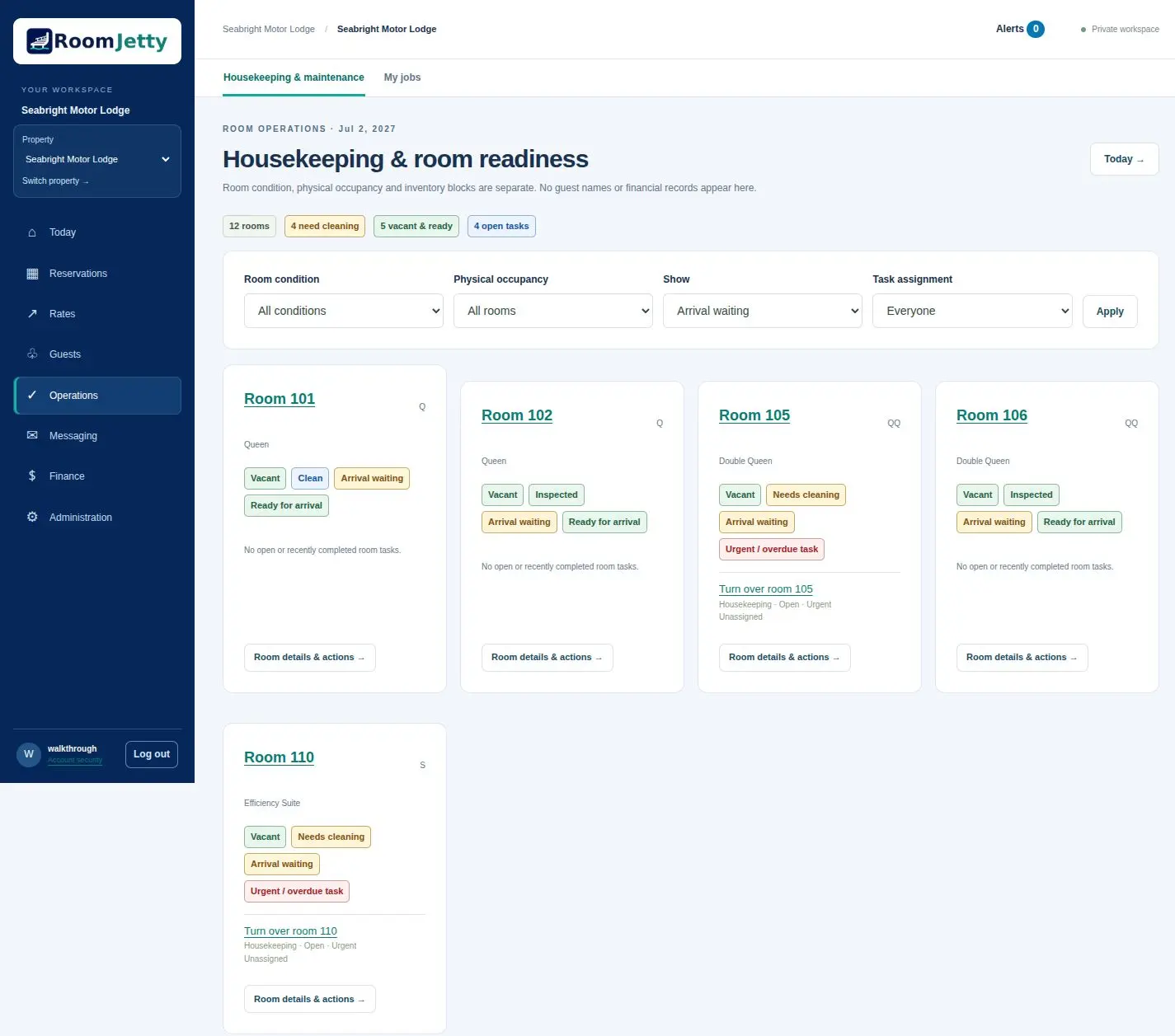
- Readiness boardSee physical occupancy, cleaning condition, arrival-due indicators and room work in one place.
- Room assignmentsAssign housekeeping work, review team workload and keep unassigned rooms visible.
- Cleaning and inspectionRecord clean rooms and use optional confirmation by a housekeeping lead.
- AccountabilityKeep the recording employee, reported housekeeper, notes and room-condition history distinct.
- Live completion updatesUpdate open staff screens and notify the team when a room is completed, with the room and employee identified.
CORE WORKSPACE
Maintenance & Work Orders
Track the job from assignment through completion.
- Task detailsCreate room-related maintenance jobs with notes, priority, due information and status.
- Assignment and workloadAssign staff, follow open and in-progress work, and review each employee’s jobs.
- Completion historyKeep completed tasks available for review and authorized lead corrections.
- Out-of-service inventoryBlock rooms or units for work so unavailable inventory is excluded from booking.
- Task notificationsSend assignment and completion alerts that open the related work screen.
CORE WORKSPACE
Staff, Timeclock & Mobile Work
Connect the office with the people turning rooms and completing jobs.
- Flexible employee rolesGive one employee multiple roles, including housekeeping and maintenance lead responsibilities.
- TimeclockClock in and out from the workspace modal or configured staff mobile app.
- Shift accountabilityFilter time reports by employee, audit manager corrections and flag unusually long open shifts.
- Employee schedulesBuild seven- or fourteen-day schedules with the property’s chosen work-week start day.
- Staff mobile appUse dedicated Timeclock, Housekeeping, Maintenance and Settings tabs; review assignments and completed work.
- Location and languageUse configured location checks, job-language preferences, mobile push alerts and in-app notices.
CORE WORKSPACE
Reporting & Accounting Exports
Turn day-to-day activity into a clearer picture of the property.
- Occupancy and booked revenueReview forward occupancy, booked revenue and the dates behind the totals.
- Booking pace and sourcesCompare booking activity and sources, with demand and website-search review tools.
- Receipts and cash drawerReview daily receipts by payment method and use cash-drawer closeout and history.
- Deposit and commission reportingReview advance deposits, payment attention and commission records.
- Portfolio viewsReview supported availability and receipt reports across the properties you can access.
- ExportsDownload supported CSV reports and accounting files for further review.
CORE WORKSPACE
Condos & Multiple Properties
Use the same workspace for different kinds of independent stays.
- Entire-unit rentalsManage an individual vacation condo with capacity, amenities, cleaning fees and deposit terms.
- Owner-use blocksReserve dates for the owner and release them back into bookable inventory when plans change.
- Nightly, weekend and weekly staysBuild rate plans and restrictions around the rental pattern you offer.
- Booking approval choicesChoose supported instant-booking or request-to-book workflows for a condo.
- Property switchingMove between authorized hotels, motels, inns and condos with separate settings and staff access.
CORE WORKSPACE
Property Settings & Access
Keep the right tools and information with the right team.
- Property administrationManage property information, room inventory, photos, policies, email settings and booking configuration.
- Scoped accessLimit staff access by organization, property and role; keep unrelated properties separate.
- Sign-in safeguardsUse employee invitations, supported authenticator verification and manager-controlled mobile unlocks.
- Audited changesRetain decision reasons and history for supported financial, guest, timeclock and operations changes.
- Notifications and live updatesUse browser push and in-app alerts; update supported calendars, dashboards, conversations and room statuses as work changes.
- Launch and recovery toolsReview setup readiness, imported history and backup health with the appropriate administrator access.
KEEP THE TEAM IN STEP
One Change. A Shared View.
When a room is cleaned, a task is completed or a reservation changes, supported staff screens update as the work happens. The front desk and the team can act on the same current information.
Walk Through a Busy Arrival Day →INCLUDED WITH YOUR SUBSCRIPTION
RoomJetty Staff, on Your Phone.
Timeclock, housekeeping, maintenance and job notifications, connected to the front desk. See the app screens and how the team uses them.
OPTIONAL ADD-ONS
More Ways to Help a Guest.
Add messaging and concierge tools when they fit your property. Explore each add-on below for features, pricing and setup requirements.
OPTIONAL ADD-ON
Textly SMS
Guest conversations from the property workspace.
- Two-way guest texting, delivery status and conversation history.
- Automatic arrival and departure texts, document links and booking or payment links.
- Contact language preferences, reviewed outgoing translation and incoming English translations.
- Consent and STOP handling, sending restrictions, usage reporting and a property spending limit.
SMS is usage-based; optional translation is charged separately.
Explore Textly SMS →OPTIONAL ADD-ON
Live Chat
Let website visitors reach your booking team.
- Guest chat that follows the visitor between website pages.
- Scheduled hours and staff availability, with an email form when nobody is available.
- Shared inbox, conversation ownership and takeover notices, saved transcripts and visitor blocking.
- Look up a bookable stay and share its booking link with a comment.
Works independently or as a handoff from AI Concierge.
Explore Live Chat →OPTIONAL ADD-ON
AI Concierge
Answer property questions and guide guests toward a stay.
- Property-specific answers using configured property facts, FAQs and approved website sources.
- Live availability lookups and validated links into the booking process.
- Conversation continuity and a fresh-conversation option.
- Live-agent handoff when Live Chat is enabled, with configured offline contact options.
Optional property subscription with an included guest-reply allowance.
Explore AI Concierge →OPTIONAL ADD-ON
Voice Concierge
Let guests talk through their plans.
- A voice option inside the existing concierge widget.
- Guests can interrupt, clarify dates and change their preferences.
- Availability results and booking links appear on screen during the conversation.
- Owner-controlled voice allowance and optional additional-time spending.
Requires AI Concierge. Live staff handoff also requires Live Chat.
Explore Voice Concierge →Built Around Your Property.
Your Website
Keep the site you already use. WordPress pages can use the RoomJetty plugin; other sites can use approved embeds or hosted booking links.
Your Team
Configure roles, mobile access, notification permissions, payment services and messaging for the people who will use them.
Your Launch
Channel-manager connection and staging tools support assisted setup. Live OTA distribution requires a separate readiness review; it is not included as an automatically active connection.
Staff mobile access requires a configured property and compatible devices. Online payments, email, SMS and push delivery require their related service setup. The guest portal currently uses private reservation links.